Install llama.cpp on Windows in one click — no code, local LLMs
One-click llama.cpp installer for Windows. No PowerShell, no build tools, no config files. MiniLLM downloads and installs llama.cpp, starts a local LLM server, and opens WebUI to chat — with builds for NVIDIA CUDA, AMD ROCm, Intel SYCL/OpenVINO, Vulkan, ARM64 and CPU, so it fits almost any GPU PC.
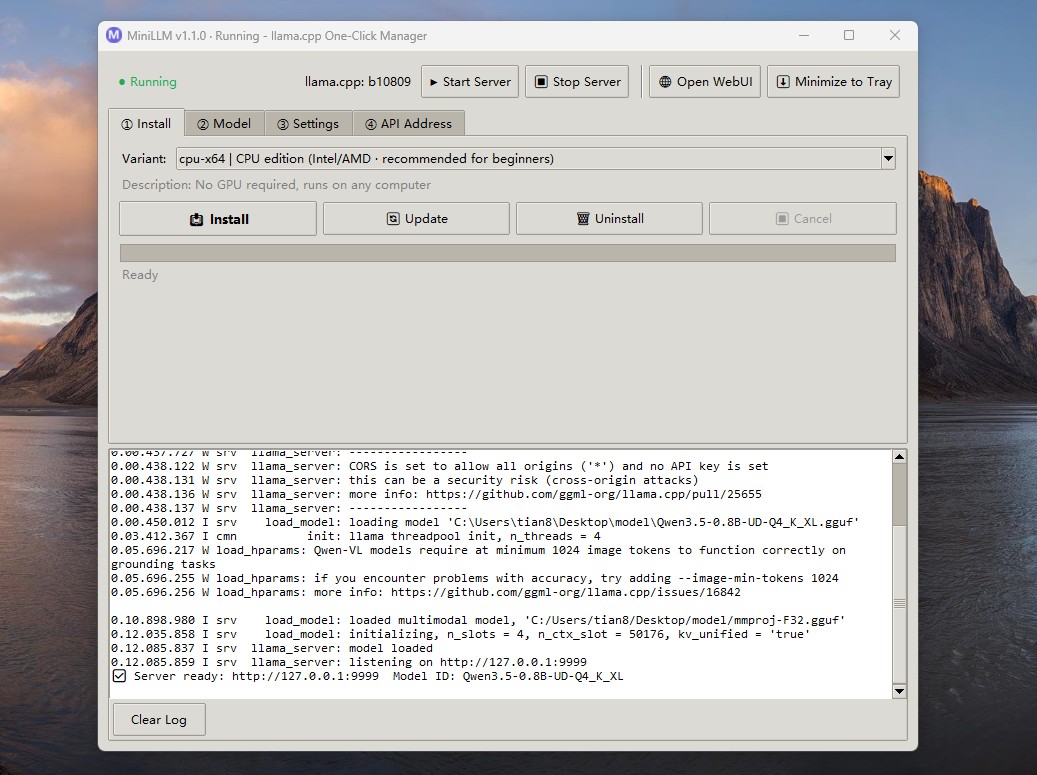
The idea — less, but better. Installing llama.cpp on Windows usually means endless commands and tuning. MiniLLM turns it into download → install → start → chat — private local inference with builds for CUDA, ROCm, Vulkan, SYCL, OpenVINO and CPU, plus vision models, LAN sharing, and an OpenAI-compatible API.
Download MiniLLM for Windows
Free llama.cpp installer & local LLM launcher — official build from minillm.bashige.com. Portable EXE, no installation wizard.

Why MiniLLM? llama.cpp without code
Install llama.cpp on Windows, start a local LLM, and match your GPU — all from one calm window. No command line.
Portable single file
Download and double-click — no installer wizard, no admin hassle. Single instance only, no port conflicts.
Install llama.cpp in one click
Install / Update / Uninstall without typing code. Start the local LLM server and open WebUI from the same window.
Every GPU, every build
NVIDIA CUDA, AMD ROCm, Intel SYCL / OpenVINO, Vulkan, CPU, ARM64 — pick the build that fits your GPU PC.
Vision models
Graphically pick .gguf + mmproj. Text-only can skip mmproj; image tasks need a matching pair.
GUI settings
Server + sampling parameters with Chat / Code presets — advanced llama-server flags without the shell.
Local OpenAI API
Local address + endpoints for apps and agents. OpenAI-compatible /v1/chat/completions.
Tray resident
Minimize to the system tray and keep serving quietly in the background.
Fresh-PC downloads
Root-certificate handling helps builds download cleanly on a new Windows install.
Works with your GPU — NVIDIA, AMD, Intel, Vulkan
One installer for every PC: discrete GPU, integrated graphics, or CPU-only. Choose the matching llama.cpp build on the Install tab — no manual driver scripting.
NVIDIA CUDA
GeForce / RTX / workstation GPUs — fastest path for most Windows AI PCs.
AMD ROCm & Vulkan
Radeon via ROCm where available, plus a portable Vulkan build for many AMD/Intel GPUs.
Intel SYCL / OpenVINO
Arc discrete graphics and Intel iGPU with SYCL or OpenVINO acceleration.
CPU & ARM64
No GPU? cpu-x64 runs on any Intel/AMD PC; arm64 for Windows on ARM devices.
Tip: run out of VRAM? Lower n_gpu_layers or switch to a smaller quant — all adjustable in Settings without code.
How to run a local LLM on Windows in 6 steps
From download to chatting with a local LLM — zero command line.
- Download MiniLLM.exe (free, no install)
Portable single file — Download MiniLLM.exe and double-click. No code.
- Pick the build for your GPU on the Install tab
NVIDIA CUDA, AMD ROCm, Intel SYCL/OpenVINO, Vulkan, or
cpu-x64(Intel/AMD, recommended for beginners). - Click Install — llama.cpp installs itself
Automatic download & install. Update / Uninstall anytime. No terminal.
- Choose your .gguf model
Set the model directory, pick a
.gguffile and optionalmmproj— all GUI. - Click Start Server
Status turns Running;
Server readyin the log means your local model is live. - Open WebUI or call the API
Chat in the browser, or use the address on the API Address tab for your apps.
Model setup — GUI, no paths to type
No path memorizing — point and click.
Four key fields
| Field | Meaning |
|---|---|
| Model Directory | Folder where model files live |
| Model File | Active .gguf language model |
| Model ID | Identifier auto-generated from file name |
| Mmproj File | Projector for vision models |
Two rules for vision
· Text-only chat → mmproj can stay empty.
· Image understanding → main model and mmproj must match.
Example: .gguf + mmproj pair loaded at http://127.0.0.1:8080.
Server & sampling settings
GUI for llama-server: context, GPU layers, ports, API key. Presets for chat and code.
| Parameter | Description |
|---|---|
| Host | 127.0.0.1 this PC only · 0.0.0.0 allow LAN |
| Port | Local port (default 8080) |
| n_ctx | Context window — larger remembers more, uses more VRAM |
| n_gpu_layers | Layers offloaded to GPU; lower if OOM |
| threads | CPU threads; -1 = auto |
| parallel slots | Concurrent slots; -1 = auto |
| API key | Password for API — required for LAN sharing |
| Offload mmproj | Offload vision projector to GPU or not |
| Extra Args | Extra llama-server flags |
| Parameter | Tips |
|---|---|
| temperature / top_p / top_k / min_p | Randomness — higher for chat, lower for code |
| repeat_penalty | Avoid looping outputs |
| n_predict | Max tokens; -1 unlimited. Raise with n_ctx if cut off |
| seed | -1 random; fixed value reproduces results |
| Presets | Chat / Code recommended combos |
- Host → 0.0.0.0
Listen on all interfaces.
- Set an API Key
Keep LAN use private.
- Allow port in Windows Firewall (TCP inbound)
Open your chosen port.
- Visit http://YOUR-PC-IP:PORT
Same LAN needs no router mapping.
Local API · OpenAI compatible
Point your RAG, agent, or app at a private local endpoint on your Windows PC.
/v1/chat/completions
Chat endpoint — send images here for vision models.
/v1/completions
Classic completions for generation tasks.
/health
Health check for readiness.
FAQ — install & run llama.cpp on Windows
Answers on one-click install, no-code setup, GPU builds, and common llama.cpp errors.
.gguf model → click Start Server. Status shows Running and the log prints Server ready. Then Open WebUI to chat.n_ctx and n_predict in Settings.n_gpu_layers, disable mmproj GPU offload, or use a smaller quantized model.%APPDATA%/MiniLLM/config.json — remembers version, models, server & sampling settings.